> ## Documentation Index
> Fetch the complete documentation index at: https://docs.qa.tech/llms.txt
> Use this file to discover all available pages before exploring further.
# Vercel Firewall
> Allow QATechBot traffic through the Vercel Firewall with a custom bypass rule
When your app is hosted on Vercel, the **Vercel Firewall** (WAF) can block QA.tech before your application runs. QA.tech identifies as [**QATechBot**](/bot) in the `User-Agent` header—you can add a firewall rule to **bypass** security checks for that traffic.
This is separate from **[Vercel Preview
Protection](/configuration/vercel-preview-protection)** (password protection,
Vercel Authentication, deployment protection). Use this page for **Firewall /
WAF** rules; use the preview guide for protected preview URLs.
## Allow QATechBot with a custom rule
Create a custom firewall rule in your Vercel project that bypasses remaining rules when the User-Agent contains `QATechBot`:
In the [Vercel dashboard](https://vercel.com), open your project → **Firewall** (or **Security → Firewall**).
Create a new custom rule with these settings:
| Field | Value |
| -------------------------- | -------------------------------------------------------------------------------- |
| **Name** | `Allow QATechBot traffic` |
| **Description** (optional) | `Bypass security rules for QATechBot user agent to allow monitoring and testing` |
| **If** | **User Agent** → **Contains** → `QATechBot` |
| **Then** | **Bypass** |
Save and publish the rule. Vercel applies firewall changes globally within seconds—no redeploy required.
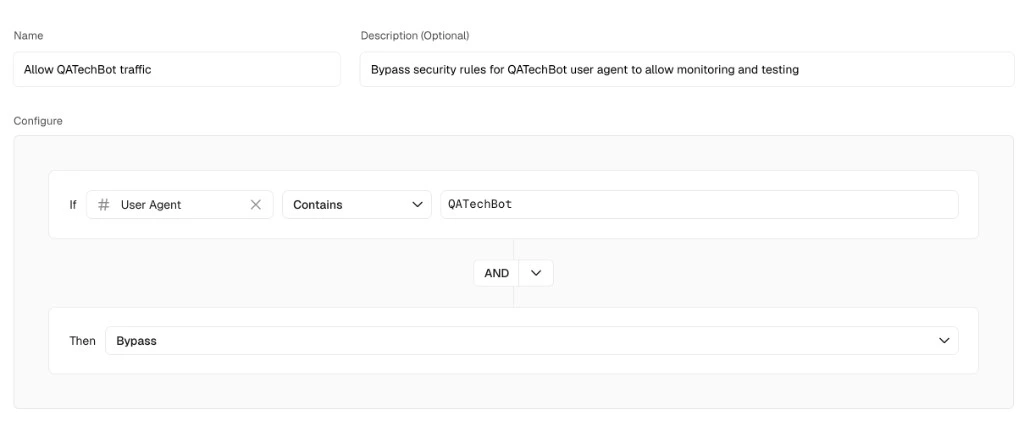 The **Bypass** action lets matching requests skip subsequent custom firewall rules (challenge, deny, rate limit, etc.) so QA.tech can load pages and run tests.
**User-Agent can be spoofed.** Any client can send `User-Agent:
...QATechBot...`. For stronger assurance, combine this rule with [QA.tech IP
allowlisting](/configuration/ip-access-control) or validate traffic using [bot
verification](/bot#verifying-qatechbot-traffic).
## User-Agent reference
QA.tech appends this suffix to browser automation traffic:
```http theme={null}
QATechBot/1.0 (+https://docs.qa.tech/bot)
```
Your rule should match on `QATechBot` (substring), which covers the full automation User-Agent.
## CLI example
You can also add the rule with the [Vercel CLI](https://vercel.com/docs/cli/firewall):
```bash theme={null}
vercel firewall rules add \
--action bypass \
--condition "user_agent,sub,QATechBot" \
--name "Allow QATechBot traffic" \
--description "Bypass security rules for QATechBot user agent to allow monitoring and testing"
```
Publish staged firewall changes when prompted.
## Related
Bypass deployment protection on preview URLs
User-Agent format and traffic verification
Allowlist QA.tech egress IPs
Edge blocking and Turnstile on Cloudflare
**External:** [Vercel WAF custom rules](https://vercel.com/docs/vercel-firewall/vercel-waf/custom-rules), [Vercel Firewall CLI](https://vercel.com/docs/cli/firewall)
The **Bypass** action lets matching requests skip subsequent custom firewall rules (challenge, deny, rate limit, etc.) so QA.tech can load pages and run tests.
**User-Agent can be spoofed.** Any client can send `User-Agent:
...QATechBot...`. For stronger assurance, combine this rule with [QA.tech IP
allowlisting](/configuration/ip-access-control) or validate traffic using [bot
verification](/bot#verifying-qatechbot-traffic).
## User-Agent reference
QA.tech appends this suffix to browser automation traffic:
```http theme={null}
QATechBot/1.0 (+https://docs.qa.tech/bot)
```
Your rule should match on `QATechBot` (substring), which covers the full automation User-Agent.
## CLI example
You can also add the rule with the [Vercel CLI](https://vercel.com/docs/cli/firewall):
```bash theme={null}
vercel firewall rules add \
--action bypass \
--condition "user_agent,sub,QATechBot" \
--name "Allow QATechBot traffic" \
--description "Bypass security rules for QATechBot user agent to allow monitoring and testing"
```
Publish staged firewall changes when prompted.
## Related
Bypass deployment protection on preview URLs
User-Agent format and traffic verification
Allowlist QA.tech egress IPs
Edge blocking and Turnstile on Cloudflare
**External:** [Vercel WAF custom rules](https://vercel.com/docs/vercel-firewall/vercel-waf/custom-rules), [Vercel Firewall CLI](https://vercel.com/docs/cli/firewall)